
The question
We want to move our website or store to a new platform. How do we avoid losing the rankings and traffic we currently have in Google?
Changing platform is often a good decision: the website becomes faster, easier to manage or cheaper to maintain. The risk lies elsewhere. If page addresses change and nobody links the old addresses to the new ones, Google and visitors land on pages that no longer exist, and traffic built up over years can drop noticeably.
The good news is that a migration can be planned so that the risk is small. This guide describes the steps that matter for visibility in Google, regardless of the platform you are leaving or moving to. It does not promise that rankings will stay unchanged: a correct migration reduces losses, but some fluctuation after launch is normal.
If you want us to handle this for you, see our service Platform migration or our service Technical SEO.
Why traffic is lost during a migration
Google has indexed the site’s pages at their current addresses and associated them with particular searches. When the platform changes, something in the structure almost always changes too: product and category addresses, titles, texts, internal links or loading speed.
Losses usually come from a few concrete causes, not from the change of platform itself:
- Old addresses that lead to a “page not found” (404) error, with no redirect.
- Blanket redirects to the home page instead of the equivalent page.
- Important pages that no longer exist on the new site or have much less content.
- Titles and meta descriptions lost when the data was moved.
- The setting that blocks indexing on the test site, left active after launch.
Step one: an inventory of the pages that matter
Before any move, make a complete list of the addresses on the current site. Useful sources are the sitemap, a crawling tool that goes through the site, Google Search Console and your traffic analytics tool.
From this list, identify the valuable pages: those that receive visits from Google, those with links from other websites, and those that bring in orders or quote requests. These are the pages where you cannot afford to make a mistake.
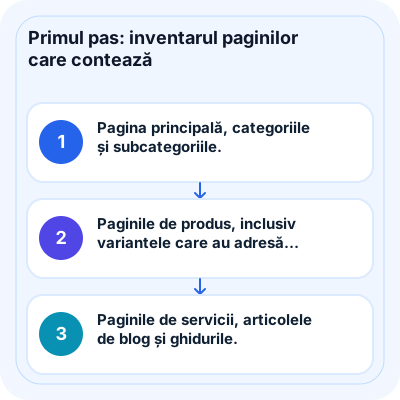
- The home page, categories and subcategories.
- Product pages, including variants that have their own address.
- Service pages, blog articles and guides.
- Informational pages that get traffic: contact, delivery, returns, frequently asked questions.
- Downloadable files or images that receive search traffic.
The redirect map: each old address to its equivalent
For each old address that changes, you identify the new address closest in subject and set up a permanent (301) redirect. This way, visitors and Google automatically reach the right page, and the signals accumulated by the old page are largely passed on to the new one.
The basic rule is equivalence: the old product leads to the same product, the old category to the corresponding category. If a product no longer exists, choose a related category or product, not the home page. Redirecting all addresses in bulk to the home page may be treated by Google as a page that does not exist, and it confuses visitors.
If the address structure can be kept identical on the new platform, so much the better: the number of redirects falls, and so does the risk of error.
- Avoid redirect chains (A to B, then B to C): link the old address directly to the final one.
- Check the variants of the same address: with and without “www”, with and without a trailing slash, with parameters.
- Also update the internal links in the menu, texts and footer so that they point directly to the new addresses.
- Keep the redirects active for the long term, not just for the first few weeks.
What must arrive intact on the new platform
Besides addresses, the move must preserve the elements that describe the pages to Google. Automatic exports between platforms sometimes omit some of them, so it is worth checking them on a representative sample of pages.
- Page titles and meta descriptions.
- Category texts and product descriptions, not just the name and price.
- Image alt text, and images at good quality.
- Canonical tags and the rules for filter pages.
- Structured data, where the new platform allows it.
- Links between pages: similar products, related articles, breadcrumbs.

Testing on a copy before launch
The new site is built and checked at a test address, password-protected or blocked from indexing, so that it does not appear in Google prematurely or compete with the current site.
On the test copy, you run the list of old addresses through the redirect map and check that each one leads, in a single step, to an existing page. This is also the time to check speed on mobile, forms, the cart and payment.
Launch day
Choose a time with lower traffic and sales, and a team available to step in. The steps below are carried out on the same day, in this order:
- Remove the protection and the indexing block from the new site.
- Activate the redirects and test them on the valuable pages in the inventory.
- Check the robots.txt file and the sitemap, then submit the new sitemap in Google Search Console.
- Check that the analytics and conversion tracking tools work on the new site.
- Place a test order or submit a test form to confirm the complete flow.
- If the domain changes as well, use the change-of-address tool in Google Search Console, following the conditions described in Google’s documentation.
Post-launch monitoring
The first few weeks show whether the migration has worked. Some variation in rankings is normal while Google reindexes the site; a large and persistent drop usually points to a specific problem that can be found and corrected.
In Google Search Console, watch the pages that report errors or are excluded from the index, compare traffic on the valuable pages in the inventory with the period before, and periodically check whether any old addresses without a redirect have appeared. Keep the export of the old site and the redirect map: they are the reference for any correction.