 Delivered project
Smart Home An entire apartment, controlled from a single place
An apartment with a separate app for each manufacturer, switches with no feedback and sensors that froze in the cloud has become a single, locally controlled system: a live floor plan of the home on desktop and phone, automations based on sensors, schedules and buttons, notifications when something goes wrong, and secure access from anywhere.
Project delivered for a client.
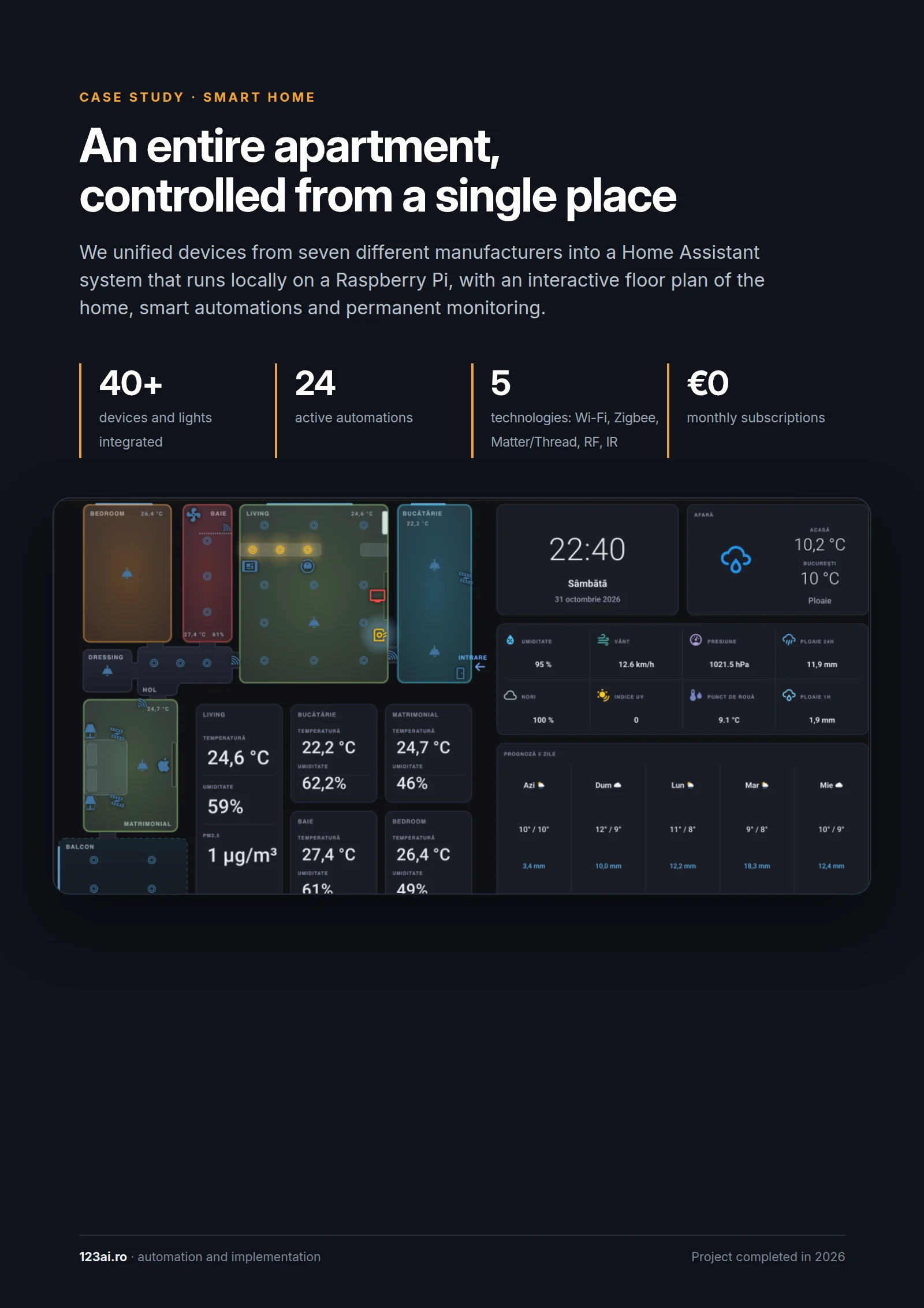
Smart Home, page by page
5 pages. Below each page you will find its text, so you can read it on your phone too.
Page 1 / 5 Read the page text
Case study · Smart home
An entire apartment, controlled from a single place
We unified devices from seven different manufacturers into a Home Assistant system that runs locally on a Raspberry Pi, with an interactive floor plan of the home, smart automations and permanent monitoring.
- 40+ devices and lights integrated
- 24 active automations
- 5 technologies: Wi-Fi, Zigbee, Matter/Thread, RF, IR
- 0 lei abonamente lunare
Project completed in 2026.
Page 2 / 5 Read the page text
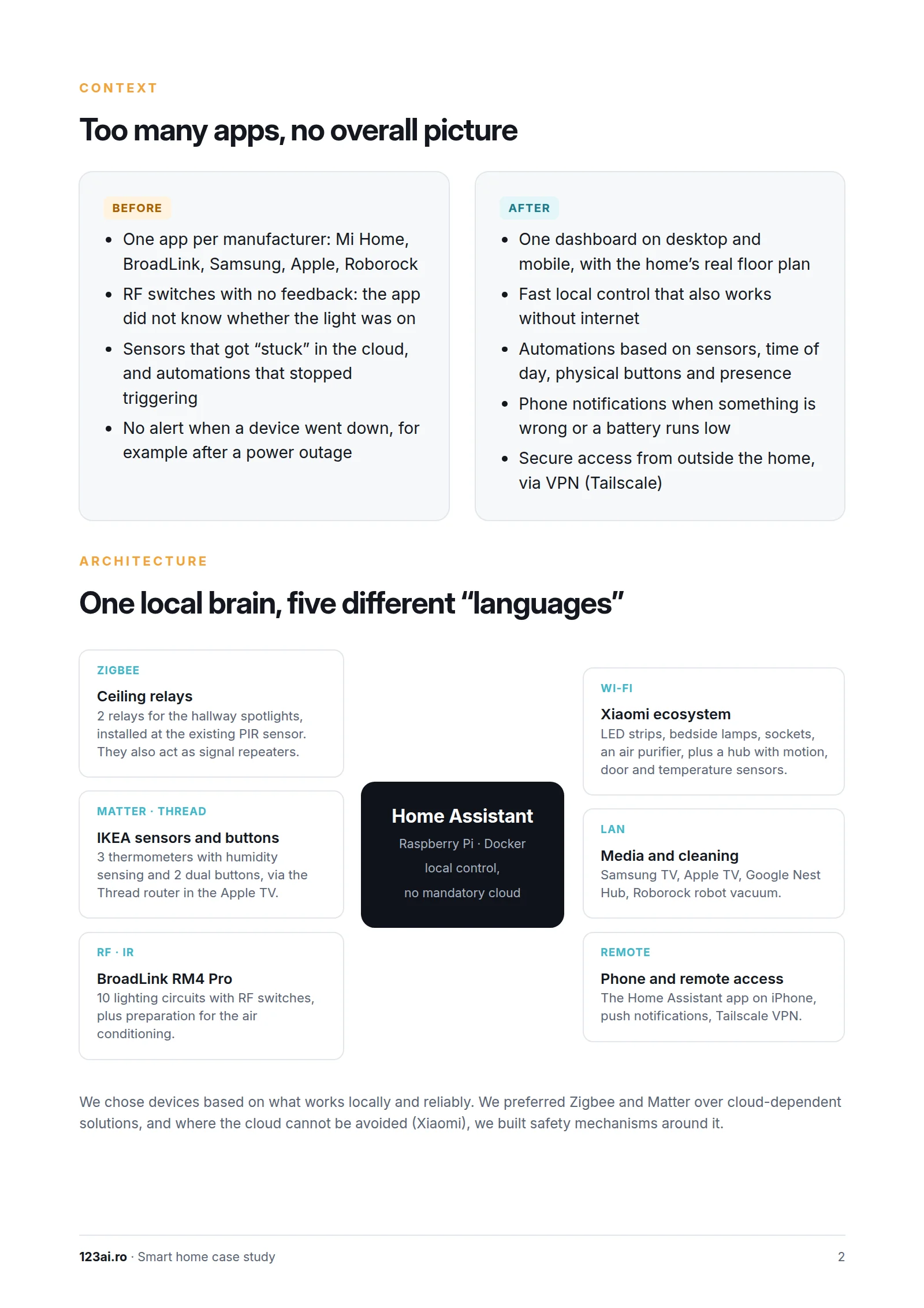
Too many apps, no overall picture
Before
- One app per manufacturer: Mi Home, BroadLink, Samsung, Apple, Roborock
- RF switches with no feedback: the app did not know whether the light was on
- Sensors that got “stuck” in the cloud, and automations that stopped triggering
- No alert when a device went down, for example after a power outage
After
- A single dashboard, on desktop and on mobile, with the real floor plan of the home
- Fast local control that also works without internet
- Automations based on sensors, time of day, physical buttons and presence
- Phone notifications when something is wrong or a battery runs low
- Secure access from outside the home, via VPN (Tailscale)
One local brain, five different “languages”
- Home Assistant on a Raspberry Pi, in Docker: local control, no mandatory cloud
- Zigbee: 2 ceiling relays for the hallway spotlights, installed at the existing PIR sensor; they also act as signal repeaters
- Matter · Thread: 3 thermometers with humidity sensing and 2 IKEA dual buttons, via the Thread router in the Apple TV
- RF · IR: BroadLink RM4 Pro for 10 lighting circuits with RF switches, plus preparation for the air conditioning
- Wi-Fi: the Xiaomi ecosystem — LED strips, bedside lamps, sockets, an air purifier, plus a hub with motion, door and temperature sensors
- LAN: Samsung TV, Apple TV, Google Nest Hub, Roborock robot vacuum cleaner
- Remote: the Home Assistant app on iPhone, push notifications, Tailscale VPN
We chose devices based on what works locally and reliably. We preferred Zigbee and Matter over cloud-dependent solutions, and where the cloud cannot be avoided (Xiaomi), we built safety mechanisms around it.
Page 3 / 5 Read the page text
The floor plan, alive
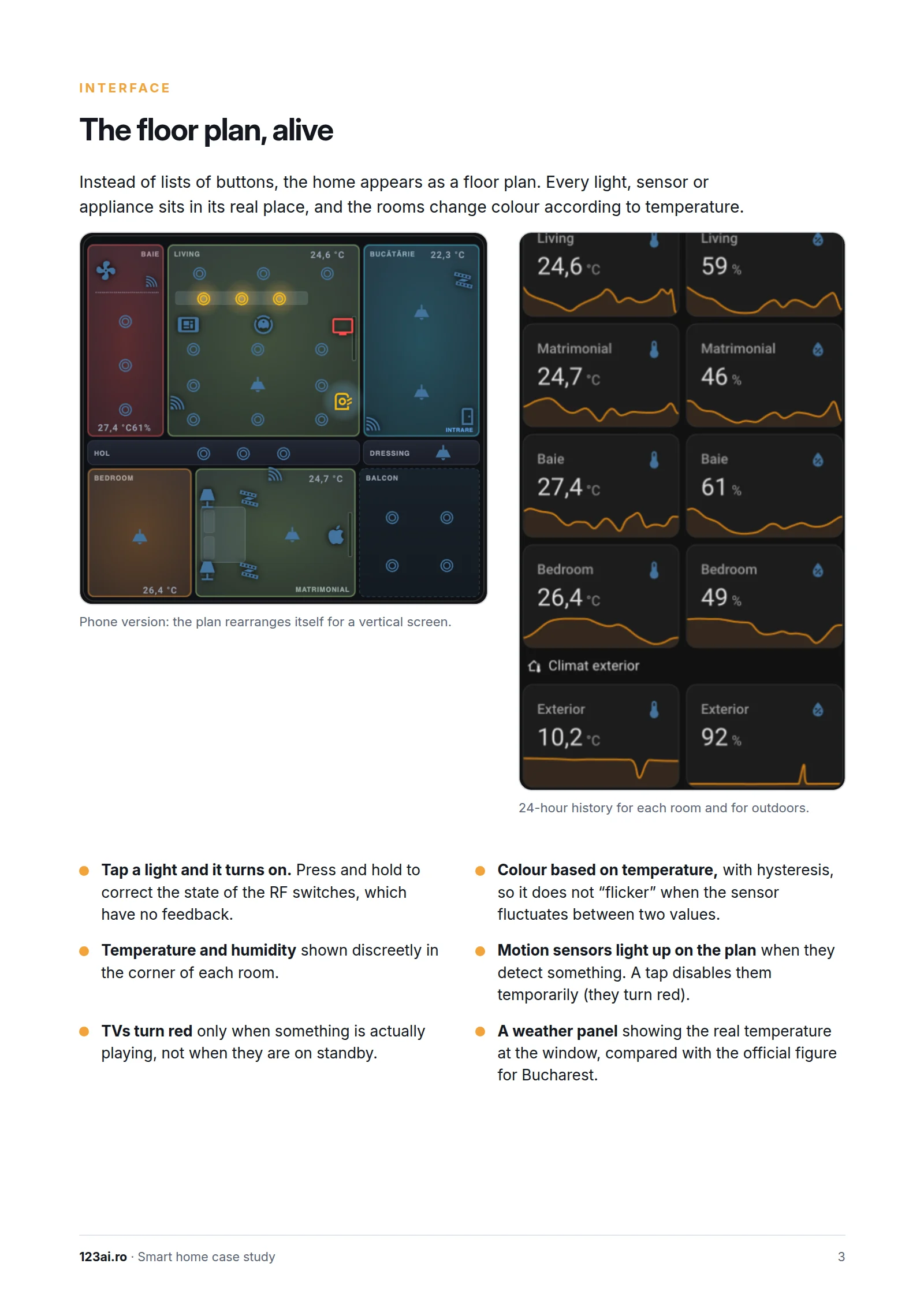
Instead of lists of buttons, the home appears as a floor plan. Every light, sensor or appliance sits in its real place, and the rooms change colour according to temperature. On a phone, the plan rearranges itself for a vertical screen, and every room has a 24-hour history.
- Tap a light and it turns on. Press and hold to correct the state of the RF switches, which have no feedback.
- Temperature and humidity shown discreetly in the corner of each room.
- TVs turn red only when something is actually playing, not when they are on standby.
- Colour based on temperature, with hysteresis, so it does not “flicker” when the sensor fluctuates between two values.
- Motion sensors light up on the plan when they detect something. A tap disables them temporarily.
- A weather panel showing the real temperature at the window, compared with the official figure for Bucharest.
Page 4 / 5 Read the page text
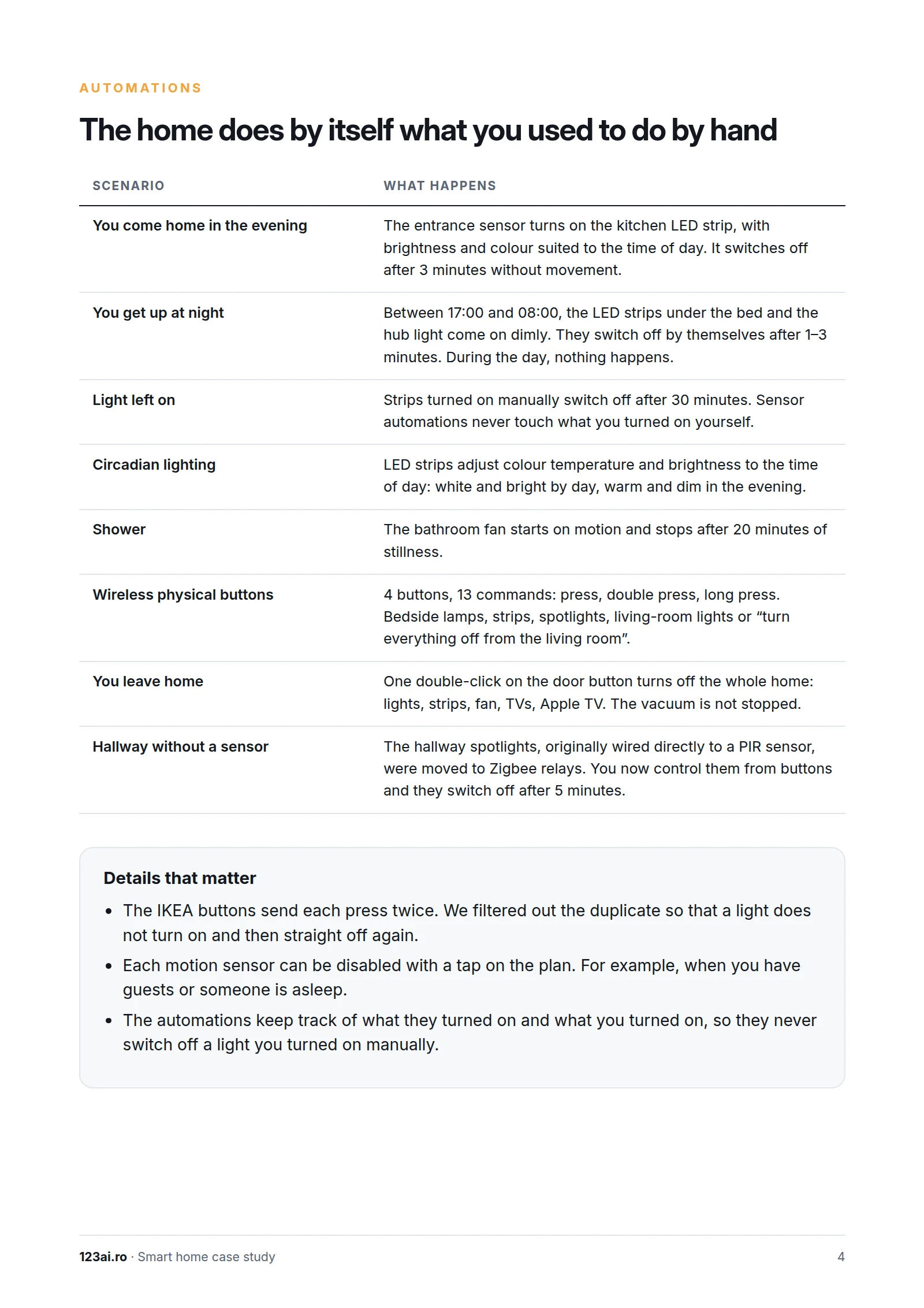
The home does by itself what you used to do by hand
- You come home in the evening: the entrance sensor turns on the kitchen LED strip, with brightness and colour suited to the time of day, and turns it off after 3 minutes without movement.
- You get out of bed at night: between 17:00 and 08:00, the LED strips under the bed and the hub light come on dimly and switch off by themselves after 1–3 minutes.
- Light left on: strips turned on manually switch off automatically after 30 minutes.
- Circadian lighting: the LED strips adjust their colour and brightness according to the time of day.
- Shower: the bathroom fan starts on motion and stops after 20 minutes of stillness.
- Wireless physical buttons: 4 buttons, 13 commands (press, double press, long press).
- You leave home: a double-click on the door button turns off the whole home; the vacuum cleaner is not stopped.
- Hallway without a sensor: the hallway spotlights now run on Zigbee relays, are controlled from buttons and switch off after 5 minutes.
Details that matter
- The IKEA buttons send each press twice; we filtered out the duplicate so that a light does not turn on and then straight off again.
- Each motion sensor can be disabled with a tap on the plan, for example when you have guests or are asleep.
- The automations keep track of what they turned on and what you turned on, so they never switch off a light that was turned on manually.
Page 5 / 5 Read the page text
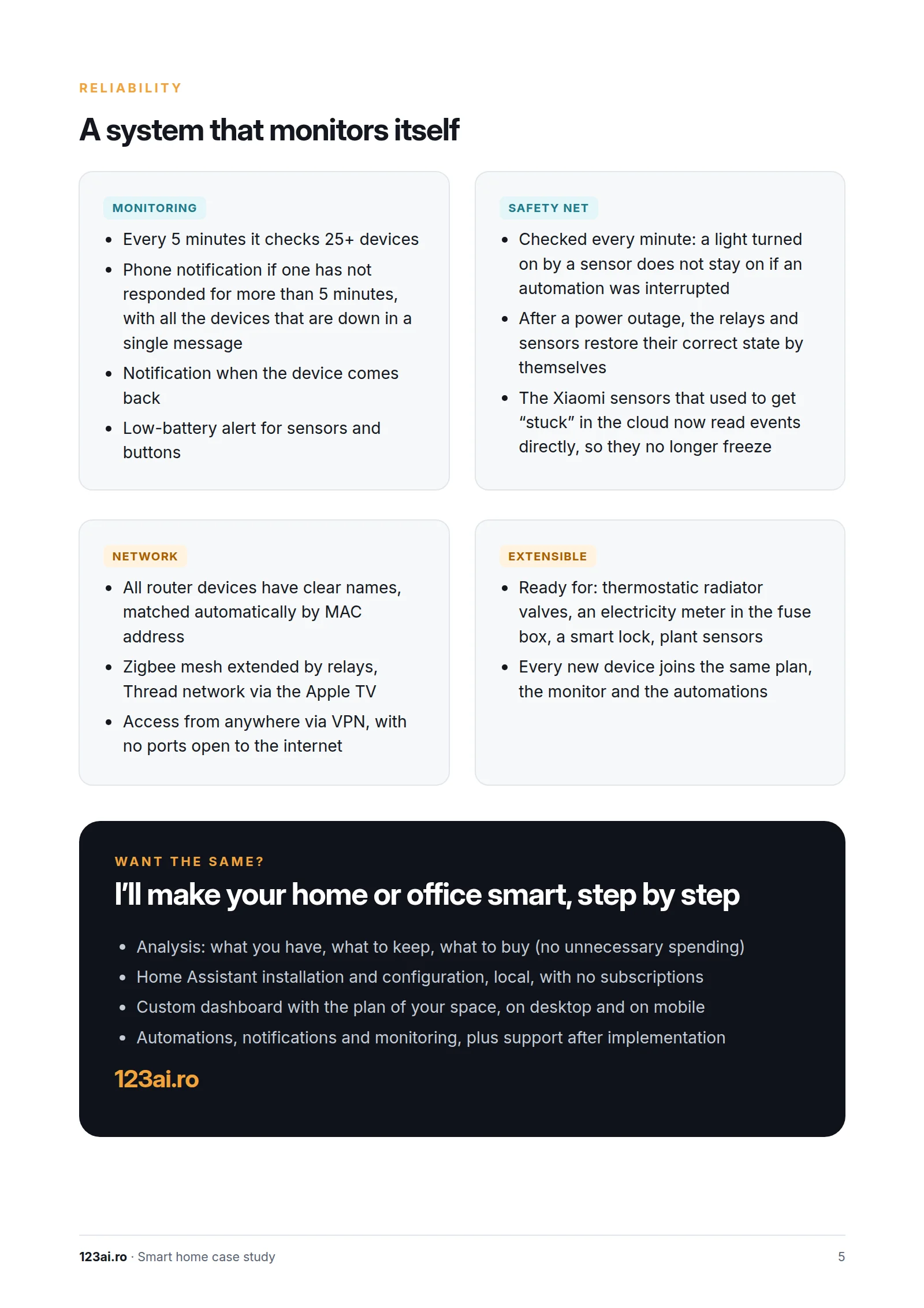
A system that monitors itself
- Monitoring: every 5 minutes it checks 25+ devices and sends to your phone, in a single message, the list of those that have not responded for more than 5 minutes; it also notifies you when they recover and when a battery runs low.
- Safety net: a light turned on by a sensor does not stay on if an automation was interrupted; after a power outage, the relays and sensors restore their own state; the Xiaomi sensors read events directly and no longer get stuck.
- Network: all devices in the router have clear names; a Zigbee mesh network extended by relays, a Thread network via the Apple TV; access from anywhere via VPN, with no ports open to the internet.
- Extensible: ready for thermostatic radiator valves, an electricity consumption meter, a smart lock and plant sensors; every new device joins the same plan, the monitor and the automations.
Want the same? I will make your home or office smart, step by step
- Analysis: what you already have, what is worth keeping, what is worth buying (no unnecessary spending)
- Home Assistant installation and configuration, local, with no subscriptions
- Custom dashboard with the plan of your space, on desktop and on mobile
- Automations, notifications and monitoring, plus support after implementation
